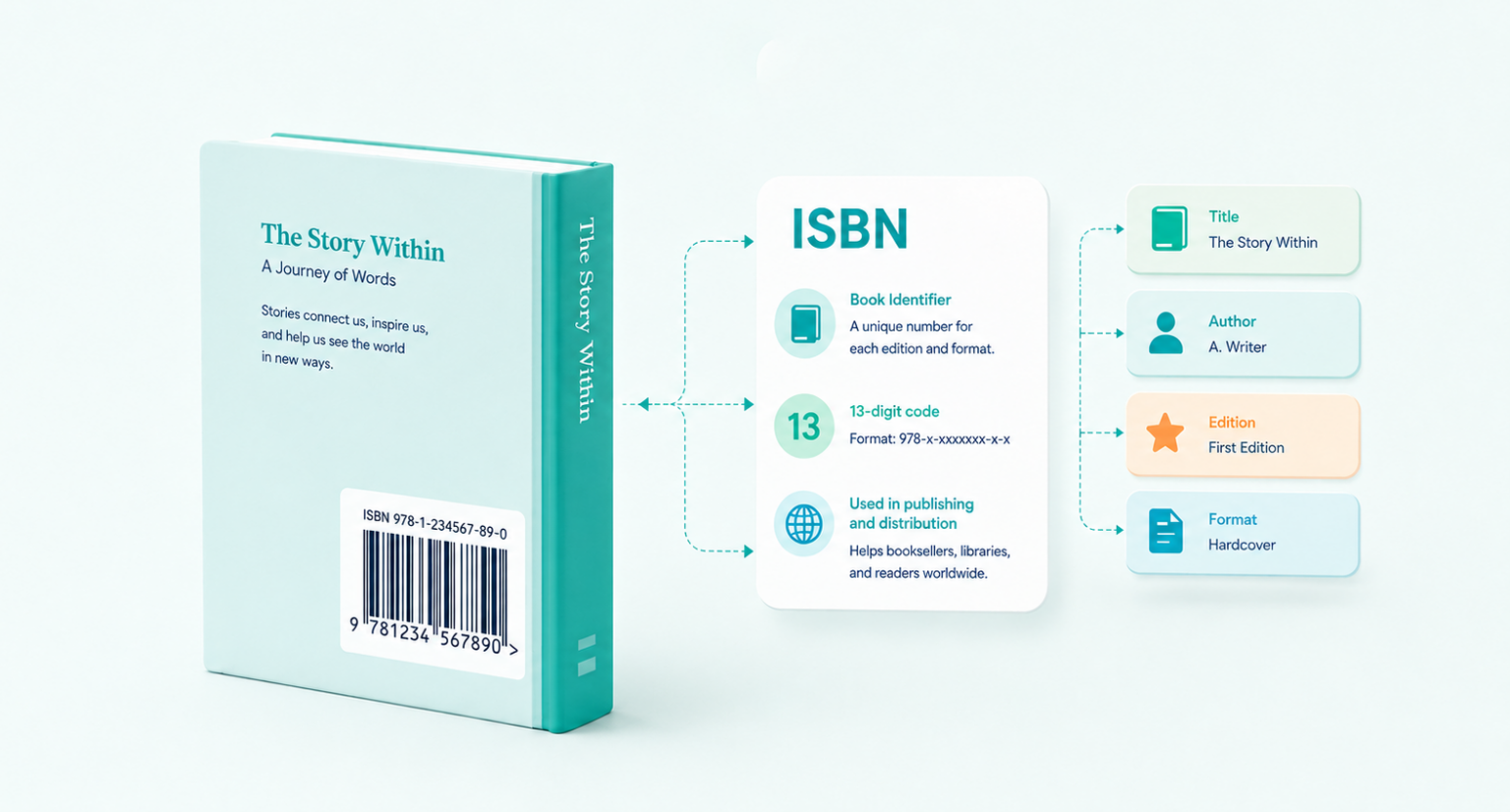
An International Standard Book Number (ISBN) is a unique, 13-digit numerical identifier assigned to books for their commercial sale and distribution. It is used as a product identifier by digital and physical libraries, online retailers, booksellers, and publishers for purposes including inventorying, ordering, listing, and selling. Readers who access these libraries or stores can also use the ISBN to identify the edition, version, or title of the book they’re looking for.
A unique ISBN is assigned to each format of a book; the eBook, audiobook, paperback, and hardback editions each receive their own. Once an ISBN is assigned, it can never be reissued to another publication, and revised editions of the same book also require a new one.
Quick answer: An ISBN (International Standard Book Number) is a unique 13-digit code that identifies a specific edition and format of a book. It lets retailers, libraries, and distributors order, list, and sell your book accurately. Each format, paperback, hardback, eBook, audiobook , needs its own ISBN.
Do You Need an ISBN?
you need an ISBN depends on where and how you plan to sell your book.
You need an ISBN if you want to:
- Sell through bookstores, libraries, or wholesale distributors
- Distribute widely through services like IngramSpark, Gardners, or Bertrams
- List your book under your own name or publishing imprint as the official publisher of record
- Sell print editions through most retail channels outside Amazon
You may not need to buy your own ISBN if:
- You’re publishing an eBook only, many platforms (including Amazon Kindle) assign their own identifier instead
- You publish exclusively through Amazon KDP, which offers a free ISBN for print books (though Amazon, not you, is listed as the publisher)
The trade-off matters: a free platform-assigned ISBN ties your book to that platform and lists the platform as publisher, which can limit wider distribution. Buying your own ISBN gives you full control over your metadata and imprint.
ISBN Fundamentals and Requirements
All forms of books are eligible for an ISBN, including educational books, maps and atlases, art and illustration books, and eBook applications. ISBN numbers are necessary for all publications, whether digital or physical. ISBNs are also issued to cassettes, CDs, and DVDs with content that is textual or educational in nature.
The ISBN typically appears on the lower portion of a book’s back cover, just above the barcode. See our guide on where to place the ISBN barcode on your cover for exact positioning. When the publication is digital, the ISBN must also appear on the title screen, i.e., the first display page or the page that displays the title. In the case of publishing educational children’s books or instructional content, the ISBN must appear in the credit titles, whether at the beginning or the end. The ISBN must also be printed on the outside packaging of any given publication.
How Many ISBNs Do You Need?
The rule is simple: each format and each new edition of your book needs its own ISBN. The same ISBN can never be reused.
| Your book | ISBNs needed |
|---|---|
| Paperback only | 1 |
| Paperback + eBook | 2 |
| Paperback + hardback + eBook + audiobook | 4 |
| A revised second edition of any of the above | +1 per format |
A reprint with no significant changes does not need a new ISBN; only a genuinely revised edition does. Because most authors publish in more than one format, buying a small block of ISBNs is usually cheaper per unit than buying them one at a time (see the cost table below).
The Anatomy of an ISBN: Number Breakdown
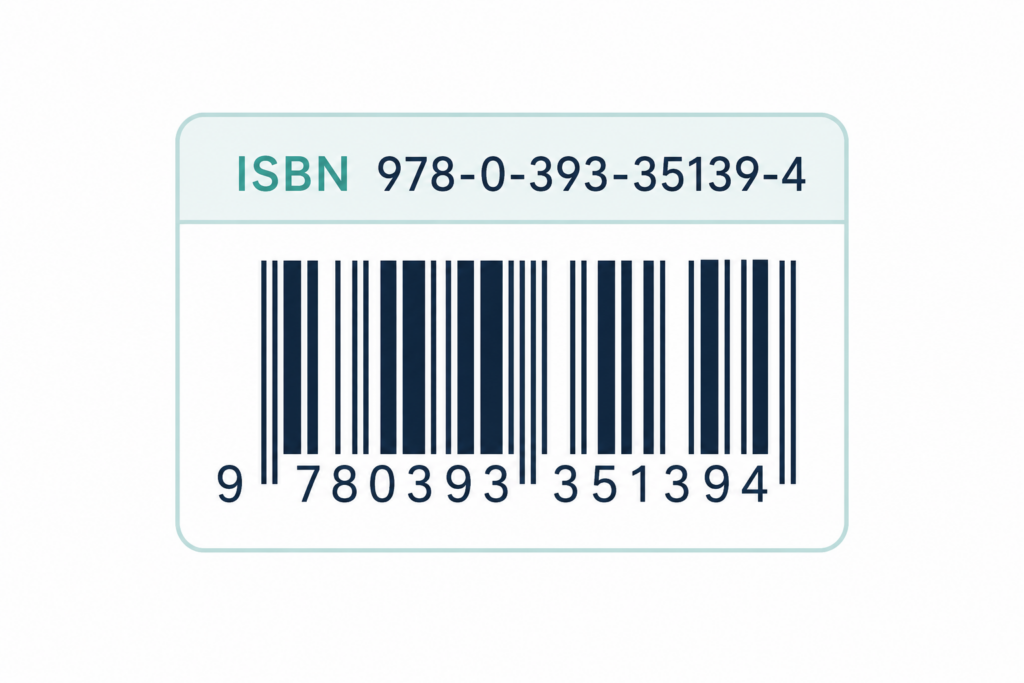
An ISBN might look like a random string of digits, but every part of it carries information. Today’s ISBNs are 13 digits long, split into five sections by hyphens. Using a sample US book ISBN — 978-0-393-35139-4 — here’s what each part tells you.
Prefix (978):
Every ISBN starts with a 3-digit prefix, which is always either 978 or 979. It signals that the number is an ISBN rather than some other kind of product code. (You’ll sometimes see it called the EAN prefix, after the international barcode standard it’s based on.)
Group (0):
The next section identifies the language or country group the book is registered in. It can be anywhere from 1 to 5 digits. Books published in the United States use 0 or 1, a group shared by English-language publishers in countries like the US, UK, Canada, and Australia. So if your book is published in the US, expect it to start with 978-0 or 978-1.
Publisher (393):
This part identifies the specific publisher. The number of digits varies: large publishers that release many titles get shorter codes (leaving more room for title numbers), while smaller publishers and self-publishers get longer ones. If you buy your own ISBNs, this is the section tied to you or your imprint as the publisher of record.
Title (35139):
This identifies the specific book and edition. Each title, and each separate format or revised edition of that title, gets its own unique number from the publisher. It can be up to 6 digits long.
Check Digit (4):
The final digit is a built-in error catcher. It’s calculated from the other 12 digits using a set formula, so if someone mistypes the ISBN when ordering or cataloging your book, the number won’t validate and the error gets flagged. It’s the system’s way of making sure the right book reaches the right shelf.
How Much Does an ISBN Cost?
The cost of an ISBN in the United States is ~$125 per book, and is supplied by Bowker. However, the cost of an ISBN depends entirely on the country you publish from, because each national agency sets its own pricing. Some countries provide ISBNs free of charge; others run the agency as a paid service.
| Country | Official agency | Single ISBN | Block of 10 |
|---|---|---|---|
| United States | Bowker (MyIdentifiers) | ~$125 | ~$295 (~$29.50 each) |
| United Kingdom | Nielsen ISBN Store | ~£89 | ~£164 |
| Canada | Library and Archives Canada | Free | Free |
| India | Raja Rammohun Roy National Agency | Free | Free |
| Australia | Thorpe-Bowker | ~AUD 44 | Discounted in blocks |
| Amazon KDP (any country) | Amazon | Free* | — |
*Amazon’s free ISBN can only be used on KDP, and Amazon is listed as the publisher rather than you.
The clearest takeaway: a single ISBN is rarely the best value. In both the US and UK, a block of 10 costs only slightly more than two or three single ISBNs, so if you’re publishing in multiple formats or planning future books, buying a block almost always saves money. Keep in mind that an ISBN is just one line item; for the full picture, see the wider cost of publishing a book.
How to Obtain an ISBN
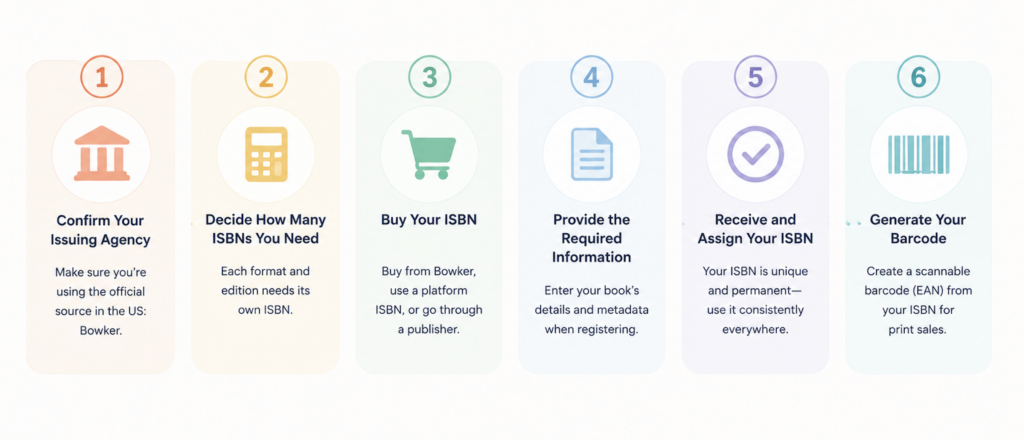
Acquiring an ISBN is a straightforward process, but the exact steps depend on your country and publishing needs. Below is a general guide to obtaining an ISBN for your book:
1. Identify Your National ISBN Agency
ISBNs are issued by national agencies designated by the International ISBN Agency. Each country has its own issuing authority, and some countries have multiple agencies for different regions or publishing needs. You can find your local ISBN agency by visiting the International ISBN Agency website.
2. Determine If You Need a Single ISBN or a Block
Self-published authors often need a single ISBN for each format of their book (paperback, hardcover, eBook, etc.).
Publishers typically purchase ISBNs in blocks to assign them to multiple books over time.
3. Apply for an ISBN
In the United States, there’s only one official source for ISBNs: Bowker, through its website MyIdentifiers.com No other US seller is an authorized agency. any third party is either reselling Bowker’s numbers (often at a markup) or issuing a platform-specific ISBN.
You have three main routes:
- Buy your own from Bowker. A single ISBN costs $125, but a block of 10 is about $295 (roughly $29.50 each). Since each format and edition needs its own ISBN, the block is almost always the better value if you’re publishing a paperback, hardback, eBook, or audiobook, or planning more than one book. Buying direct makes you (or your imprint) the official publisher of record.
- Use a free ISBN from your publishing platform. Amazon KDP, for example, provides a free ISBN for print books. The trade-off: it can only be used on that platform, and the platform, not you, is listed as the publisher. That’s fine for a KDP-exclusive release, but it limits wider distribution.
- Go through a self-publishing company. Many full-service publishers assign an ISBN as part of their package, so you may not need to buy one separately.
Outside the US, ISBNs are handled by each country’s own national agency, some, like Canada, provide them for free.
4. Provide Required Information
When you register an ISBN with Bowker, you’re creating the book’s core metadata record, which feeds retailers, libraries, and databases like Books in Print. The more complete and accurate this is, the more discoverable your book becomes. Be ready to provide:
- Title and subtitle: exactly as they appear on your cover, since this is what shows up in retailer listings.
- Author and contributor names: the author, plus any co-authors, editors, illustrators, or translators, with their roles.
- Format / binding type: paperback, hardcover, eBook, audiobook, etc. Remember each format needs its own ISBN, so you’ll register each one separately.
- Publisher / imprint name: the name you want listed as the publisher of record. For self-publishers, this can be your own publishing name rather than just your author name.
- Publication date: the date the book is (or will be) available for sale.
- Description: a short summary or back-cover blurb for the book’s listing.
- Subject / category (BISAC codes): the standardized codes that classify your book’s genre and help it surface in the right sections of retailer and library catalogs.
- Price and currency: your list price, if you’re setting one at registration.
- Audience and page count: supporting details like target readership and length.
You don’t have to fill in every optional field, but a richer book metadata record means better placement and discoverability across the supply chain — so it’s worth completing as much as you can.
5. Receive and Assign Your ISBN
Once approved, you will receive your ISBN. Ensure it is correctly placed on the book’s cover, copyright page, and metadata to ensure proper identification.
6. Register Your ISBN (Optional but Recommended)
Registering your ISBN with an online book database or bookseller (such as Bowker’s Books in Print or Nielsen’s ISBN Database) improves discoverability and ensures accurate listing in global retail and library systems.
ISBN vs. Barcode, ASIN, and ISSN
These identifiers are often confused with the ISBN, but each does something different.
ISBN vs. Barcode
An ISBN is the number; the barcode is the scannable image that encodes it. The barcode printed on a book’s back cover (a Bookland EAN) is generated from the ISBN so retailers can scan it at the point of sale. You need the ISBN first; the barcode is created from it.
ISBN vs. ASIN
An ASIN (Amazon Standard Identification Number) is Amazon’s own internal identifier, assigned automatically to every product on Amazon, including Kindle eBooks. An ASIN only works within Amazon. An ISBN works everywhere. A Kindle eBook can sell with just an ASIN, but you’ll need an ISBN to distribute it beyond Amazon. Read more about the difference between ISBN vs ASIN.
ISBN vs. ISSN
An ISSN (International Standard Serial Number) identifies serial publications, journals, magazines, and newspapers that are published on an ongoing basis, whereas an ISBN identifies a one-off book or a specific edition of one.
Start Your Publishing Journey FOR FREEUsage and Legal Implications
Although an ISBN is an international identifier, they are issued separately by organizations in each country. There are over 160 of these organizations in the world. Some organizations function under the government as national libraries, while some ISBN registration companies are funded by non-state organizations.
These organizations can issue ISBNs to publishers. Most publishers acquire a unique publisher block from the ISBN issuing authority to represent themselves in the supply chain. Moreover, while an ISBN is merely an identifier and does not provide any legal protection (such as rights over intellectual property or copyright protection), some countries have made it illegal to publish books without having an ISBN allocated to them.
FAQ: What Is an ISBN for a Book?
Q: How do I check my ISBN?
To verify an ISBN, you can use an ISBN lookup tool available on platforms like the International ISBN Agency, bookseller websites, or library databases. The ISBN’s meaning includes its role as a unique identifier, making it easy to check a book’s edition, publisher, and registration details online.
Q: Is an ISBN unique for every book?
Yes, an ISBN is unique for each version and edition of a book. This applies to different formats such as hardcover, paperback, eBook, and audiobook. Revised editions also require a new ISBN to differentiate them from previous versions.
Q: Is it illegal to sell a book without an ISBN?
No, it is not illegal to sell a book without an ISBN. However, it is important for book tracking and distribution. Some countries mandate ISBNs for published books, but self-published authors and independent sellers can still sell books without an ISBN, especially through personal websites or local retailers. However, major bookstores and online platforms like Amazon require an ISBN for listing.
Q: How much does it cost to get an ISBN?
The cost of an ISBN ranges from $10 to $125 per ISBN, with discounts for bulk purchases. The cost of an ISBN also varies by country. In some places, like Canada and India, ISBNs are free. In others, such as the U.S. (through Bowker) and the U.K. (through Nielsen), ISBNs must be purchased.
Q: How do I get my own ISBN?
To obtain an ISBN, visit your national ISBN agency’s website (such as Bowker in the U.S. or Nielsen in the U.K.). The ISBN includes its function as a regulated identifier issued by official organizations. You’ll need to provide details about your book, including the title, format, and publisher information.
Q: What makes an ISBN valid?
A valid ISBN must meet the official ISBN requirements, including:
A correct 13-digit format (or a 10-digit format for older books).
The proper hyphenation structure that separates its elements (EAN, group, publisher, title, and check digit).
A correct check digit, which verifies the ISBN’s authenticity through a mathematical formula.