

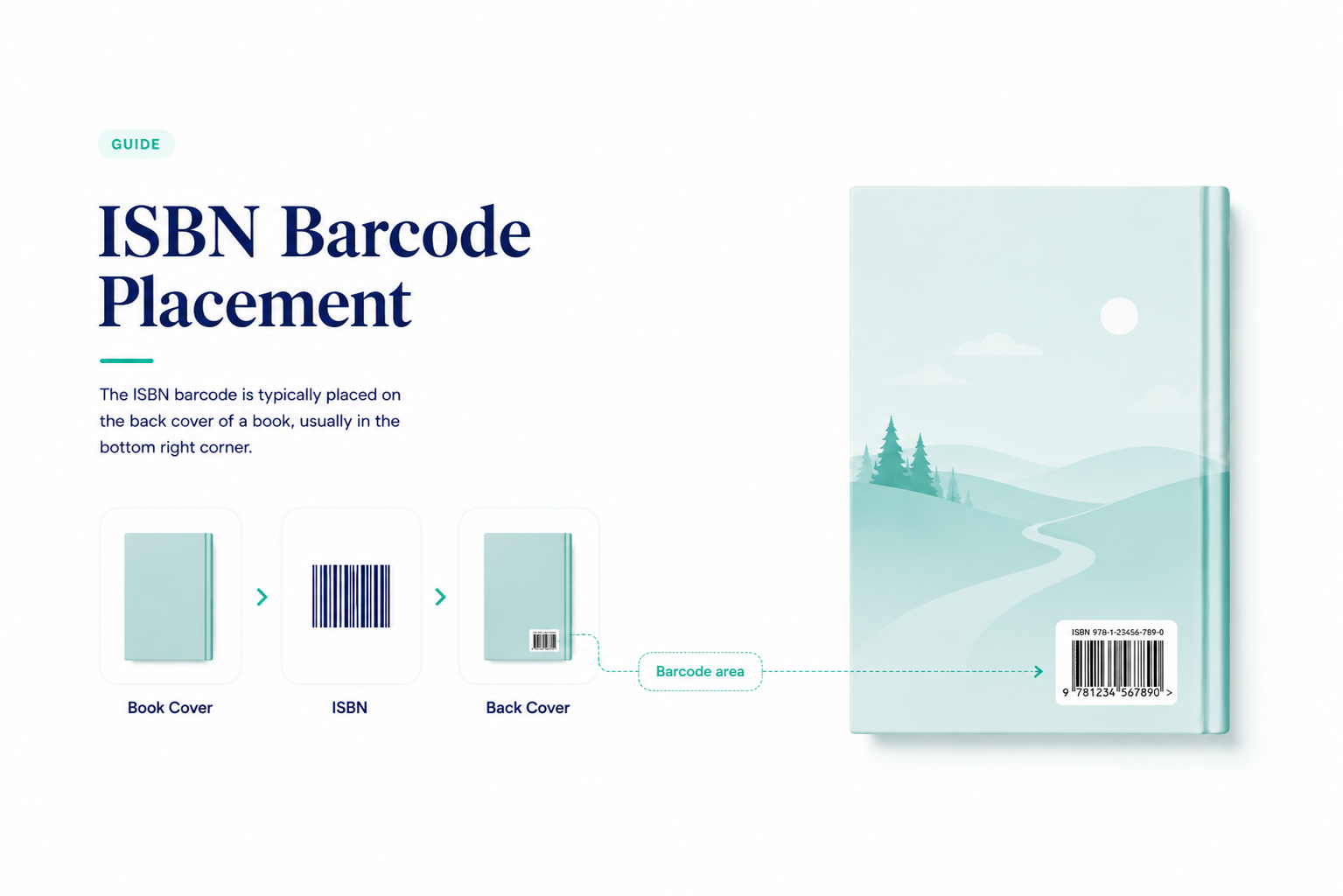
If you’re preparing your book cover for print, the ISBN barcode usually goes on the back cover, near the bottom, where it can be scanned easily without interfering with the design.
The barcode should be clear, high-contrast, and placed on a light background. It should not be stretched, cropped, covered by artwork, or placed too close to the spine or trim edge.
In simple terms: the ISBN identifies your book, and the barcode helps retailers, bookstores, libraries, and distributors scan it correctly.
ISBN Barcode Placement at a Glance
| Question | Best Practice |
|---|---|
| Where does the ISBN barcode go? | On the back cover |
| Best placement | Lower section of the back cover, usually bottom-right or bottom-left |
| Should it go on the front cover? | No, unless there is an unusual design or packaging reason |
| Should it be near the spine? | Avoid placing it too close to the spine |
| Should it be near the trim edge? | No, leave safe space around it |
| Best background | White or light solid background |
| Can it overlap artwork? | No, keep it clean and easy to scan |
| Can I resize it? | Only carefully. Do not stretch, distort, or make it too small |
| Who checks it? | Your printer, publishing platform, or cover designer should confirm the final file |
Where Should the ISBN Barcode Go on a Book Cover?
The ISBN barcode usually belongs on the back cover of a printed book, near the bottom, where booksellers, retailers, and distributors can scan it easily.
For most books, the best placement is in the lower section of the back cover, often toward the right or left side, depending on the cover layout. The barcode should sit on a clean, light background with enough space around it so it does not touch the spine, trim edge, text, or artwork.
This placement matters because the barcode is not just a design detail. It helps retailers identify the book, process sales, manage inventory, and connect the physical copy to the correct title and edition.
What is an ISBN?
The International Standard Book Number (ISBN) is a unique identifier assigned to each edition of a book, making it easily distinguishable in the vast world of literature. Comprising a series of digits and lines, this unassuming barcode serves as a book’s fingerprint, allowing for precise tracking, distribution, and sales monitoring. Its significance lies in its ability to streamline the management of books, from production to point of sale, ensuring that the right book reaches the right reader.
Why the Barcode Usually Goes on the Back Cover
The front cover has one main job: to attract readers. It needs to showcase the title, author name, imagery, and overall mood of the book. Placing the barcode on the front cover can distract from that design and make the book look less polished.
The back cover is more practical. It already holds supporting information like the book description, author bio, publisher details, price, and sometimes endorsements. Adding the ISBN barcode there keeps the front cover clean while making the barcode easy to find and scan.
This is especially important if your book will be sold through bookstores, libraries, online retailers, or print-on-demand services. A barcode that is easy to scan helps the book move more smoothly through the retail and distribution process. For more context, see our guide to book distribution.

The Basics of Barcode Labels
Barcode labels are the digital passports of your book, facilitating its journey from the printing press to the reader’s hands. In this section, we explore the fundamental elements of barcode labels, emphasizing their crucial role in ensuring seamless book distribution.
Barcode Label Components: A typical barcode label consists of two key components: the barcode symbol and the check digit. The barcode symbol is the visual representation of the ISBN, encoded in a series of lines and spaces. The check digit serves as a mathematical safeguard to validate the accuracy of the ISBN. Together, they create a unique and reliable identifier for your book.
Importance of Image Quality: Image quality is paramount when it comes to barcode labels. A crisp, well-defined barcode ensures reliable scanning, reducing the risk of errors at the point of sale. Factors like resolution, contrast, and print quality play a vital role in enhancing scanner readability.
General Rules for Barcode Label Creation: To guarantee the effectiveness of barcode labels, adhering to industry standards is essential. This includes maintaining a specified label size, format, and background color. Consistency in these aspects ensures that your barcode is universally compatible and easily recognized by scanners in various retail environments.
Printing the Barcode vs. Using a Label
When adding an ISBN barcode to your book cover, you usually have two options: print the barcode directly on the cover or apply it later as a label.
| Option | Best for | Pros | Cons |
|---|---|---|---|
| Printing the barcode directly on the cover | Most professionally published books | Looks clean, feels professional, does not peel, and is part of the final cover file | If the barcode is wrong, the cover file may need to be corrected and reprinted |
| Using an add-on label | Short runs, last-minute changes, or temporary fixes | Allows flexibility if the barcode changes late in the process | Can look less polished, may peel, and may affect barcode readability over time |
For most authors, printing the barcode directly on the back cover is the better option. It looks more professional and avoids issues with peeling, misalignment, or label damage. Labels can be useful in specific cases, but they are usually not ideal for a finished book that will be sold widely.
If you are preparing a full print cover, make sure the barcode placement works with the overall back cover layout, including the book description, author bio, price, and trim size. You may also want to review these book cover design tips before finalizing the file.
ISBN Barcode Placement Rules to Keep in Mind
A barcode needs to be scannable, not just visible. Before sending your cover to print, check that:
- The barcode is placed on the back cover, not the front cover.
- It sits on a white or light solid background.
- It is not placed over busy artwork or texture.
- It is not stretched, cropped, rotated, or distorted.
- It has enough clear space around it.
- It is not too close to the spine, trim line, or edge of the cover.
- The ISBN on the barcode matches the ISBN listed in your book metadata.
These small details can prevent problems later. A barcode that is hard to scan may cause issues with retailers, distributors, or inventory systems. If your book will appear in multiple formats, such as paperback, hardcover, and eBook, remember that each format may need its own ISBN. You can learn more in our guide to ISBNs for self-published books.
Do eBooks Need an ISBN Barcode?
No. eBooks do not need a physical barcode because there is no printed cover to scan. An eBook may still have an ISBN, depending on the platform and distribution plan, but the barcode itself is only needed for printed books.
For example, if you are publishing on Amazon, your book may also receive an ASIN, which is Amazon’s internal product identifier. That is different from an ISBN. You can read the full explanation in our guide to ISBN vs ASIN.
FAQ: ISBN Placement On a Book Cover
Q: Where should the ISBN barcode be placed on a book cover?
The ISBN barcode is usually placed on the back cover, often near the bottom, where it is easy for retailers and scanners to read.
Q: Can the ISBN go on the front cover?
Usually, the ISBN is not placed on the front cover.. The front cover should focus on the title, author name, and design. The barcode belongs on the back cover unless there is a special production reason.
Q: Does an eBook need an ISBN barcode?
No. eBooks may have an ISBN, but they do not need a physical barcode because there is no printed cover to scan.
Q: Should the barcode be printed directly on the book cover?
For most books, yes. Printing the barcode directly on the back cover looks more professional and avoids peeling or label damage.
Q: What happens if an ISBN on a book does not scan?
Retailers, bookstores, or distributors may have trouble processing the book. You may need to correct the cover file before printing or distribution.